Friday, December 15, 2017

IAM's New Playground Blockchain


As we all are hearing buzzword bitcoin and blockchain everyday and every industry is evaluating use cases where Blockchain can be leveraged to solve conventional problems. IAM industry has also been started to use this new technology to build identity products and platforms.

Please click on below link to know more how Blockchain is complementing IAM (Identity & Access Management) domain:

Can IAM solutions benefit from Blockchain?

Friday, October 30, 2015

Get started using Oracle Identity Manager 11gR2 PS3

Learn Oracle Identity Manager 11gR2 PS3

  • This introductory series of short Oracle by Example tutorials will help you get started using Oracle Identity Manager 11gR2 PS3. The tutorials in this series will help you learn how to:
    • Install and prepare an Oracle Database for Oracle Identity and Access Management Suite
    • Setup an Oracle Identity Manager 11gR2 PS3 environment
    • Work with Oracle Identity Manager entities
    • Provision Oracle Identity Manager accounts using a connector
Click below link to open up tutorial

Setting-up an Oracle Identity Manager 11gR2 PS3 environment

Thursday, June 6, 2013

Propagate Changes from OIM User Profile to Target (Resources)

Propagate the changes from OIM User profile to a target (resource e.g. OID or ODSEE)

Go to Design Console and then open up the lookup table 'Lookup.USR_PROCESS_TRIGGERS' and map the OIM User profile attributes with corresponding tasks e.g. 'USR_FIRST_NAME' is a user profile attribute and 'Change First Name' task is corresponding target Task name. With this configuration when you make changes to 'First Name' then the changes automatically propagates to Target e.g. ODSEE or OID.


Wednesday, April 17, 2013

Trusted User Recon Setup for OID-11.1.1.5.0 ICF Based Connector

Oracle launched OID-11.1.1.5.0 ICF connector which supports the following directory servers
Oracle Directory Server Enterprise Edition (ODSEE), Oracle Internet Directory (OID), Oracle Unified Directory (OUD), and Novell eDirectory.

By default the connector is configured for Target User reconciliation if you want to configure the connector for Trusted User recon then make the following changes

1. Go to the design console and search for the lookup table 'Lookup.LDAP.Configuration'.
2. Update the decode value with 'Lookup.LDAP.UM.Configuration.Trusted' of 'User Configuration Lookup' code key as shown in picture.


3. Save the changes.
4. Run the Trusted User Recon job 'LDAP Connector Trusted User Reconciliation'.

Friday, March 8, 2013

java.io.InvalidClassException: org.eclipse.persistence.indirection.IndirectList

Due to Eclipselink.jar incompatibility within JDeveloper I faced the following exception:


Exception in thread "main" javax.ejb.EJBException: failed to unmarshal interface java.util.List; nested exception is: 
java.io.InvalidClassException: org.eclipse.persistence.indirection.IndirectList; local class incompatible: stream classdesc serialVersionUID = 4038061360325736360, local class serialVersionUID = -494763524358427112; nested exception is: java.io.InvalidClassException: org.eclipse.persistence.indirection.IndirectList; local class incompatible: stream classdesc serialVersionUID = 4038061360325736360, local class serialVersionUID = -494763524358427112
java.io.InvalidClassException: org.eclipse.persistence.indirection.IndirectList; local class incompatible: stream classdesc serialVersionUID = 4038061360325736360, local class serialVersionUID = -494763524358427112


Solution:

Replace the Eclipselink.jar with the JAR file found at the following location:

 Middleware_Home\oracle_common\modules\oracle.toplink_11.1.1\eclipselink.jar

Compile and Run the program again and it will run without any problem.

Wednesday, March 6, 2013

Get OIM DB Connection

We have OIM APIs to get connection to OIM DB and we can fire up a query to get data from OIM DB tables.

           
/**
* OIM DB Table: UPA_UD_FORMFIELDS
*Column Name: OLD_VALUE

*/

String query =
               "select * from UPA_UD_FORMFIELDS";

Connection connection = Platform.getOperationalDS().getConnection();
PreparedStatement prepared_statement = connection.prepareStatement(query);
ResultSet resultSet = prepared_statement.executeQuery();

String  field_old_value = resultSet.getString("OLD_VALUE");
            
            System.out.println("field_old_value: "+field_old_value);


List of OIM DB tables:

http://www.reachdba.com/showthread.php?701-OIM-List-of-Tables-and-Description

Tuesday, October 16, 2012

OIM 11gR1: Update Password Change Next Logon Status in OIM

Use Case: When OIM admin or Java API resets a user's password then OIM always forces a user to reset the password on next OIM logon, to avoid the force reset password on next log in we have to update column 'USR_CHANGE_PWD_AT_NEXT_LOGON' in 'USR' table for that user.

Note: It's not recommendation, it's just a work around.

Approaches:

#1.

Get Database connection to OIM schema and update that column value using SQLDevelopr or any DB IDE

SQL Satement:
update usr set USR_CHANGE_PWD_AT_NEXT_LOGON='0'  where usr_login = 'UserID';

Where USR_CHANGE_PWD_AT_NEXT_LOGON='0' means there is no force reset password on next logon.
USR_CHANGE_PWD_AT_NEXT_LOGON='1' means OIM forces the user to reset the password on next logon.

#2.

OIM Java API

Note: Following JAR files used to run the following Java code. It's better you develop your code using JDeveloper IDE.


  1. xlDataObjects.jar (Path: middleware\iam_home\designconsole\lib)
  2. oimclient.jar    (Path: middleware\iam_home\designconsole\lib)


    protected static void updatePasswordChangeNextLogonStatus(String oimUserId,
                                                              String logon_status_value) {


        OIMClient oimClient = null;
        tcDataProvider dbProvider = null;

        try {

            System.setProperty("java.security.auth.login.config",
                               "file:config/authwl.conf");
            Hashtable env = new Hashtable();
            env.put(OIMClient.JAVA_NAMING_FACTORY_INITIAL,
                    "weblogic.jndi.WLInitialContextFactory");
            env.put(OIMClient.JAVA_NAMING_PROVIDER_URL,
                    "t3://" + hostname + ":" + port);
            oimClient = new OIMClient(env);
            oimClient.login(username, password.toCharArray());


            XLClientSecurityAssociation.setClientHandle(oimClient);
            PreparedStatementUtil pstmt = new PreparedStatementUtil();
            dbProvider = new tcDataBaseClient();
            String query =
                "update usr set USR_CHANGE_PWD_AT_NEXT_LOGON='" + logon_status_value +
                "' where USR_LOGIN='" + oimUserId + "'";


            pstmt.setStatement(dbProvider, query);
            pstmt.executeUpdate();


        } catch (tcDataSetException ex) {
            logger.error(ex.getMessage(), ex);


        } catch (LoginException loginEx) {
            logger.error(loginEx.getMessage(), loginEx);


        } catch (tcDataAccessException ex) {
            logger.error(ex.getMessage(), ex);

        } finally {
                   if (dbProvider != null) {
            try {
                dbProvider.close();
            } catch (Exception e) {
                logger.error(e.getMessage(), e);
            }
        }
        try {
            XLClientSecurityAssociation.clearThreadLoginSession();
        } catch (Exception e) {

        }
        if (oimClient != null) {
            oimClient.logout();
        }
        }


    }

You can leverage the above Java code to update any column in USR table to modify any user's attribute but I would recommend to use this approach only when there is no direct API to update user's attribute.


Thursday, December 22, 2011

OIM 11g - Export Failed

If you are getting the "Export Failed" message while trying to export metadata from Deployment Manager under Identity Manager Advanced Administration and you have applied all your tricks.

Perform the following steps:

  1. Modify your java.policy in the JRE_HOME/lib/security/ directory.

  2. Replace the existing policy file content with the following:

    grant{ permission java.security.AllPermission; }; 
  3. Restart the browser to laod the policy again. You can now export the data.


    For more information follow the URL: http://docs.oracle.com/cd/E25054_01/doc.1111/e14308/deploymgmt.htm#BABGBEIA


    I hope this would fix your file export issue.

Wednesday, December 15, 2010

Display Child Organizations

If you want to display all the child organizations of a parent organization then use the following code :-

<block name='test org' trace="true">
<set name='finalChildOrgList'>
<list/>
</set>

<set name='orgsList'>
<new class='java.util.ArrayList'/>
</set>
<set name='orgObject'>
<getobj>
<s>ObjectGroup:</s>
<s>Top</s> <!-- direct pass parent Orgnization (ObjectGroup Name) name -->
</getobj>
</set>

<invoke name='getChildObjectGroups'>
<ref>orgObject</ref>
<ref>orgsList</ref>
</invoke>

<dolist name='tempOrgName'>
<ref>orgsList</ref>
<appendAll name='finalChildOrgList'>
<invoke name='getDisplayName'>
<ref>tempOrgName</ref>
</invoke>
</appendAll>
</dolist>

<cond>
<contains>
<ref>finalChildOrgList</ref>
<s>End User</s>
</contains>
<removeAll name='finalChildOrgList'>
<s>End User</s>
</removeAll>
</cond>

<ref>finalChildOrgList</ref>

</block>

Wednesday, March 3, 2010

Scripted JDBC Resource

Sun Identity Manager contains Scripted JDBC resource adapter to provide more flexibility to perform Database functions i.e execute vendor specific database stored procedures which are difficult to execute by using native Database Resource Adapters.

Here are steps to configure and create a user account on Database by using Scripted JDBC resource adapter.

Step 1#

Make Scripted JDBC Resource available to IdM resource list after selecting the 'Configure Manager Resources' from 'Resource Type Actions' tab under Resource section.
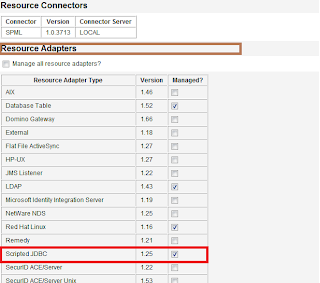


Step 2 #

Create a Database Table 'users'.
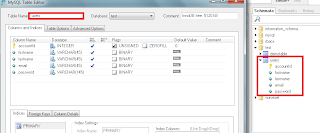


Step 3 #

Before adding Scripted JDBC resource in IdM let's first create Resource Actions which will actually Create , Update and Delete a user record on Scripted JDBC resource.

To create Resource Actions just follow the conventions of either BeanShell or JavaScript (Rhino) which is located at following directory

WS_HOME\idm\sample\ScriptedJdbc\SimpleTable\beanshell

I have modified following Resource Actions just to create a new account on Scripted JDBC resource

1.SimpleTable-createUser-bsh.xml
2.SimpleTable-getUser-bsh.xml

Note: GetUser Resource Action is required to implement for Scripted JDBC Resource Adapter to work properly.

Here is my version of Create and GetUSer Resource Action

Demo-createUser-bsh


import java.sql.PreparedStatement;

/*
* First define helper methods
*/
void flushResults(PreparedStatement st) {
try {
int result = 1;
boolean more = true;
while (more) {
// what did we get?
int rowCount = st.getUpdateCount();
if (rowCount >= 0) {
// this result is an update count
// println("Result " + Util.itoa(result) +
// " update count " + Util.itoa(rowCount));
} else {
// not an update count
ResultSet rs = st.getResultSet();
if (rs != null) {
rs.close();
} else {
// no more
more = false;
}
}
// with Oracle driver...
if (more)
more = st.getMoreResults();
result++;
}
}
catch (Throwable t) {
t.printStackTrace();
throw t;
}
}
// START HERE
id = actionContext.get("id");
conn = actionContext.get("conn");
action = actionContext.get("action");
errors = actionContext.get("errors");
trace = actionContext.get("trace");
password = actionContext.get("password");
attrs = actionContext.get("attributes");

StringBuffer sqlCmdBuf = new StringBuffer();
sqlCmdBuf.append("INSERT INTO users ");
sqlCmdBuf.append("(accountId,password,firstname,lastname,email)");
sqlCmdBuf.append("VALUES(?,?,?,?,?)");
String sql = sqlCmdBuf.toString();
PreparedStatement s = null;
try {
s = conn.prepareStatement(sql);
s.setString(1, id);
s.setString(2, password);
s.setString(3, attrs.get("firstname"));
s.setString(4, attrs.get("lastname"));
s.setString(5, attrs.get("email"));
s.execute();
flushResults(s);
} finally {
if (s != null)
s.close();
}

Demo-getUser-bsh


import java.sql.ResultSet;
import java.sql.PreparedStatement;
id = actionContext.get("id");
conn = actionContext.get("conn");
action = actionContext.get("action");
errors = actionContext.get("errors");
trace = actionContext.get("trace");
result = actionContext.get("result");

StringBuffer sqlCmdBuf = new StringBuffer();
sqlCmdBuf.append("SELECT firstname,lastname,email FROM users");
sqlCmdBuf.append(" where accountId = ?");
String sql = sqlCmdBuf.toString();
PreparedStatement st = null;
ResultSet res = null;
try {
st = conn.prepareStatement(sql);
st.setString(1, id);
res = st.executeQuery();
if ( res.next() ) {
// Populate attrMap with the queried user attributes
java.util.Map attrMap = new java.util.Hashtable();
String firstname = res.getString("firstname");
if (firstname != null) { attrMap.put("firstname", firstname); }
String lastname = res.getString("lastname");
if (lastname != null) { attrMap.put("lastname", lastname); }
String email = res.getString("email");
if (email != null) { attrMap.put("email", email); }
// Put the attrMap into the result
result.put("attrMap", attrMap);
}
} finally {
if (res != null)
res.close();
if (st != null)
st.close();
}


Step 4#

Now add Scripted JDBC Resource in IdM and configure the schema mapping for user account attributes

Step 4.1# Select Resource Type - Scripted JDBC
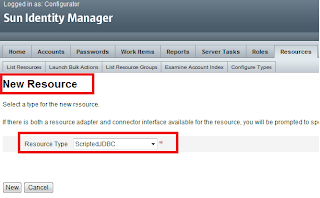


Step 4.2# Configure MySQL database table.
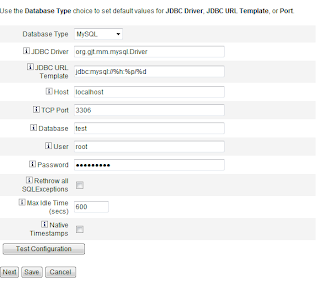


Step 4.3# Map customized Resource Action for Get User and Create User action
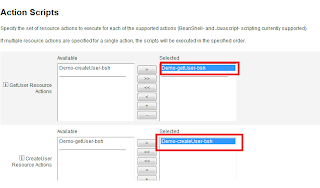


Step 4.4# Resource Schema Mapping


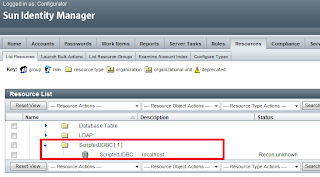
Step 4.5#

Finally, Scripted JDBC Resource appears in the Resource List to manage user accounts.


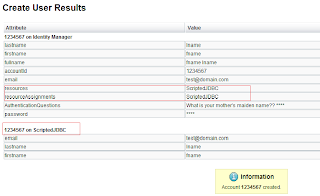
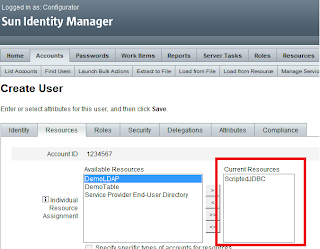
Step 5#. Create New User Account on Scripted JDBC Resource


We can add our own customized Resource Actions to perform Database related operations.

Use the following URL to get more information about Scripted JDBC Resource Adapter

http://docs.sun.com/app/docs/doc/820-6551/giivs?a=view

Saturday, February 20, 2010

Active Sync V/S Reconciliation

As we always hear about ActiveSync and Reconciliation processes and these two terms always confuse us a little bit.

Here is a link that must help you to understand the difference between these two processes.

whats-the-difference-between-reconciliation-and-active-sync

Monday, January 11, 2010

Sun IdM Console in Action


Sun Identity Manager comes with a very useful utility which is called "console".
This utility is a command based interface that let a user to execute commands to perform actions on IdM components.

How to launch it?

Here, I am explaining this utility with NetBeans IDE 6.5 for Sun Identity Manager 8.1.

Netbeans IDE must have Sun IdM plugin installed before to launch this utility.

Steps:
  1. Go to project tab.
  2. Right click on IdM project as shown in pic.
  3. Click on Run LH Command and you would get a text field to enter your command
  4. Type 'console' and hit the trigger 'OK'.

You will get a console screen under the output window of NetBeans IDE.

Just type command 'help' and you will have a list of all available commands.

Let's try 'encrypt' command which is used to encrypt a password
Configurator> encrypt password
1E6FE9F6D24D74B2:13B0E3B8:12339160537:-7FEE|jJ8rkCnJ6th14cGmXzYi0w==
Configurator>

'encrypt' command returns an encrypted value of input string as have seen in above example.

Following are some important commands


Friday, December 11, 2009

Explore Sun Identity Manager For Your Organization

A cognitive journey to Sun Identity Manger Product to touch the power of SUN (Sun Microsystem)

https://www.sun.com/offers/details/buyers_guide_1008.xml

Click on above link to

Guide to Evaluating and Buying Identity Management


from Sun's offer

Tuesday, June 16, 2009

Common Build Environment (CBE)

Netbean IDE provides IDM plug-in to develop IDM application with CBE (Common Build Environment).

This CBE is very useful to handle complete IDM build process.
Even it makes multiple environments build process easy and intuitive.

Go to the below link to get the complete understanding of CBE:

http://wikis.sun.com/display/sunidmdev/Using+the+CBE#UsingtheCBE-FileReference

How To Setup An IDM Project

Just imagine you are a newbie in Sun IDM development then you are definitely bogged down with
enormous new terminologies like build-process, XML imports and build-targets etc.
Now, you require a mentor who could teach you everything related to development and deployment of an IDM application. So, to get a quick insight into IDM platform and have a virtual mentor

Friday, June 12, 2009

How to create groups in LDAP or Active Directory (AD) from Workflow

As we know very well that LDAP or Active Directory(AD)is always being used to store data in hierarchical structure by making different-different Groups.

The Groups in LDAP or AD can be expanded to any level in hierarchical structure.
There is always LDAP or AD Administrator who creates Groups in a domain as per
predefined requirement.

But sometimes as an IDM developer you might face a situation to create a Group
dynamically after being evaluated some logics in your business Work Flow.


Here is my endeavor to make your work little bit smoother

<Action id='0' name='create groups in LDAP'>
<expression>
<block name='create groups in LDAP' trace='true'>
<set name='resourceObject'>
<invoke name='getObject'>
<invoke name='getLighthouseContext'>
<ref>WF_CONTEXT</ref>
</invoke>
<invoke name='findType' class='com.waveset.object.Type'>
<s>Resource</s>
</invoke>
<s>DemoLDAP</s> <!-- LDAP or AD resource name -->
</invoke>
</set>
<set name='resourceAdapterHandle'>
<invoke name='findAdapter' class='com.waveset.provision.ResourceOp'>
<ref>resourceObject</ref>
<invoke name='getCache'>
<invoke name='getLighthouseContext'>
<ref>WF_CONTEXT</ref>
</invoke>
</invoke>
</invoke>
</set>
<set name='newOUGenericObject'>
<new class='com.waveset.object.GenericObject'>
<map>
<s>objectId</s>
<s>ou=GroupName,dc=test,dc=root</s> <!-- Group name -->
<s>objectType</s>
<s>Organizational Unit</s>
</map>
</new>
</set>
<invoke name='createObject'>
<ref>resourceAdapterHandle</ref>
<ref>newOUGenericObject</ref>
<map/>
</invoke>
</block>
</expression>
</Action>

Friday, June 5, 2009

Make Process Diagram Visible in IDM 8.1


In IDM 8.1 the visibility of the Process Diagram is disabled by default.

But sometime you want to see the flow of a workflow's activities then you go to

process diagram in Admin Interface.

To make the process diagram visible do the following changes in


'Configuration:System Configuration' xml file.

<Attribute name='disableProcessDiagrams'>
<Boolean>false</Boolean>
</Attribute


By default the attribute 'disableProcessDiagrams' value is true.

Note: Please restart your application to get the effects of changes in the IDM.

Stop Active Sync

Suppose you have a requirement to stop your active sync not from admin interface.

Then you are bound to contemplate to achieve that then you slew to programming paradigm to meet the requirement.

Hey no need to bring sweat in your euphoria just mail me to get remedy

ravinder.fbd@gmail.com

Monday, May 18, 2009

Search users in LDAP

Here you can search users in LDAP by using the below code.

Note: DemoLDAP is the name of the resource which is configured in your IDM.

<Activity id='2' name='search LDAP'>
<Action id='0' name='search LDAP'>
<expression>
<block name='search LDAP..' trace='true'>
<set name='searchResults'>
<invoke name='getResourceObjects' class='com.waveset.ui.FormUtil'>
--returns list of users whose objectClass is Top in LDAP
<invoke name='getLighthouseContext'>
<ref>WF_CONTEXT</ref>
</invoke>
<s>User</s> --- Searching Users
<s>DemoLDAP</s>  -------- Name of LDAP resource which is configured in IDM
<map>
<s>searchContext</s> ---Name of container wherein you want to  perform  search
<s>ou=People,DC=test,DC=edu</s>
<s>searchScope</s>
<s>subTree</s>
<s>searchAttrsToGet</s> --- name of attribute which you want to search (it's value must be a list)
<list>
<s>uid</s>
</list>
<s>searchFilter</s>  ----- attributes on which you want to perfomr your search   
<s>objectClass=Top</s>
</map>
</invoke>
</set>
<dolist name='users'>
<ref>searchResults</ref> ----List of users being searched in above method
<get>
<ref>users</ref>
<s>uid</s>  ---- attribute that you wanted to fetch
</get>
</dolist>
</block>
</expression>
</Action>


searchFilter value could be changed as per your search criteria e.g givenName='John' or city='New York'.