Friday, March 8, 2013

java.io.InvalidClassException: org.eclipse.persistence.indirection.IndirectList

Due to Eclipselink.jar incompatibility within JDeveloper I faced the following exception:


Exception in thread "main" javax.ejb.EJBException: failed to unmarshal interface java.util.List; nested exception is: 
java.io.InvalidClassException: org.eclipse.persistence.indirection.IndirectList; local class incompatible: stream classdesc serialVersionUID = 4038061360325736360, local class serialVersionUID = -494763524358427112; nested exception is: java.io.InvalidClassException: org.eclipse.persistence.indirection.IndirectList; local class incompatible: stream classdesc serialVersionUID = 4038061360325736360, local class serialVersionUID = -494763524358427112
java.io.InvalidClassException: org.eclipse.persistence.indirection.IndirectList; local class incompatible: stream classdesc serialVersionUID = 4038061360325736360, local class serialVersionUID = -494763524358427112


Solution:

Replace the Eclipselink.jar with the JAR file found at the following location:

 Middleware_Home\oracle_common\modules\oracle.toplink_11.1.1\eclipselink.jar

Compile and Run the program again and it will run without any problem.

Wednesday, March 6, 2013

Get OIM DB Connection

We have OIM APIs to get connection to OIM DB and we can fire up a query to get data from OIM DB tables.

           
/**
* OIM DB Table: UPA_UD_FORMFIELDS
*Column Name: OLD_VALUE

*/

String query =
               "select * from UPA_UD_FORMFIELDS";

Connection connection = Platform.getOperationalDS().getConnection();
PreparedStatement prepared_statement = connection.prepareStatement(query);
ResultSet resultSet = prepared_statement.executeQuery();

String  field_old_value = resultSet.getString("OLD_VALUE");
            
            System.out.println("field_old_value: "+field_old_value);


List of OIM DB tables:

http://www.reachdba.com/showthread.php?701-OIM-List-of-Tables-and-Description

Tuesday, October 16, 2012

OIM 11gR1: Update Password Change Next Logon Status in OIM

Use Case: When OIM admin or Java API resets a user's password then OIM always forces a user to reset the password on next OIM logon, to avoid the force reset password on next log in we have to update column 'USR_CHANGE_PWD_AT_NEXT_LOGON' in 'USR' table for that user.

Note: It's not recommendation, it's just a work around.

Approaches:

#1.

Get Database connection to OIM schema and update that column value using SQLDevelopr or any DB IDE

SQL Satement:
update usr set USR_CHANGE_PWD_AT_NEXT_LOGON='0'  where usr_login = 'UserID';

Where USR_CHANGE_PWD_AT_NEXT_LOGON='0' means there is no force reset password on next logon.
USR_CHANGE_PWD_AT_NEXT_LOGON='1' means OIM forces the user to reset the password on next logon.

#2.

OIM Java API

Note: Following JAR files used to run the following Java code. It's better you develop your code using JDeveloper IDE.


  1. xlDataObjects.jar (Path: middleware\iam_home\designconsole\lib)
  2. oimclient.jar    (Path: middleware\iam_home\designconsole\lib)


    protected static void updatePasswordChangeNextLogonStatus(String oimUserId,
                                                              String logon_status_value) {


        OIMClient oimClient = null;
        tcDataProvider dbProvider = null;

        try {

            System.setProperty("java.security.auth.login.config",
                               "file:config/authwl.conf");
            Hashtable env = new Hashtable();
            env.put(OIMClient.JAVA_NAMING_FACTORY_INITIAL,
                    "weblogic.jndi.WLInitialContextFactory");
            env.put(OIMClient.JAVA_NAMING_PROVIDER_URL,
                    "t3://" + hostname + ":" + port);
            oimClient = new OIMClient(env);
            oimClient.login(username, password.toCharArray());


            XLClientSecurityAssociation.setClientHandle(oimClient);
            PreparedStatementUtil pstmt = new PreparedStatementUtil();
            dbProvider = new tcDataBaseClient();
            String query =
                "update usr set USR_CHANGE_PWD_AT_NEXT_LOGON='" + logon_status_value +
                "' where USR_LOGIN='" + oimUserId + "'";


            pstmt.setStatement(dbProvider, query);
            pstmt.executeUpdate();


        } catch (tcDataSetException ex) {
            logger.error(ex.getMessage(), ex);


        } catch (LoginException loginEx) {
            logger.error(loginEx.getMessage(), loginEx);


        } catch (tcDataAccessException ex) {
            logger.error(ex.getMessage(), ex);

        } finally {
                   if (dbProvider != null) {
            try {
                dbProvider.close();
            } catch (Exception e) {
                logger.error(e.getMessage(), e);
            }
        }
        try {
            XLClientSecurityAssociation.clearThreadLoginSession();
        } catch (Exception e) {

        }
        if (oimClient != null) {
            oimClient.logout();
        }
        }


    }

You can leverage the above Java code to update any column in USR table to modify any user's attribute but I would recommend to use this approach only when there is no direct API to update user's attribute.


Thursday, December 22, 2011

OIM 11g - Export Failed

If you are getting the "Export Failed" message while trying to export metadata from Deployment Manager under Identity Manager Advanced Administration and you have applied all your tricks.

Perform the following steps:

  1. Modify your java.policy in the JRE_HOME/lib/security/ directory.

  2. Replace the existing policy file content with the following:

    grant{ permission java.security.AllPermission; }; 
  3. Restart the browser to laod the policy again. You can now export the data.


    For more information follow the URL: http://docs.oracle.com/cd/E25054_01/doc.1111/e14308/deploymgmt.htm#BABGBEIA


    I hope this would fix your file export issue.

Wednesday, December 15, 2010

Display Child Organizations

If you want to display all the child organizations of a parent organization then use the following code :-

<block name='test org' trace="true">
<set name='finalChildOrgList'>
<list/>
</set>

<set name='orgsList'>
<new class='java.util.ArrayList'/>
</set>
<set name='orgObject'>
<getobj>
<s>ObjectGroup:</s>
<s>Top</s> <!-- direct pass parent Orgnization (ObjectGroup Name) name -->
</getobj>
</set>

<invoke name='getChildObjectGroups'>
<ref>orgObject</ref>
<ref>orgsList</ref>
</invoke>

<dolist name='tempOrgName'>
<ref>orgsList</ref>
<appendAll name='finalChildOrgList'>
<invoke name='getDisplayName'>
<ref>tempOrgName</ref>
</invoke>
</appendAll>
</dolist>

<cond>
<contains>
<ref>finalChildOrgList</ref>
<s>End User</s>
</contains>
<removeAll name='finalChildOrgList'>
<s>End User</s>
</removeAll>
</cond>

<ref>finalChildOrgList</ref>

</block>

Wednesday, March 3, 2010

Scripted JDBC Resource

Sun Identity Manager contains Scripted JDBC resource adapter to provide more flexibility to perform Database functions i.e execute vendor specific database stored procedures which are difficult to execute by using native Database Resource Adapters.

Here are steps to configure and create a user account on Database by using Scripted JDBC resource adapter.

Step 1#

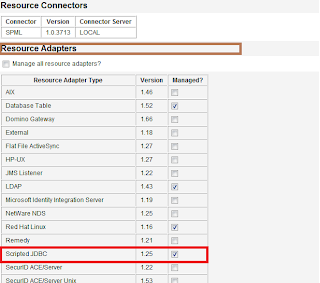
Make Scripted JDBC Resource available to IdM resource list after selecting the 'Configure Manager Resources' from 'Resource Type Actions' tab under Resource section.


Step 2 #

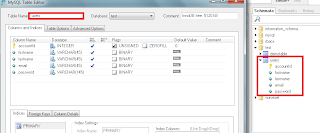
Create a Database Table 'users'.


Step 3 #

Before adding Scripted JDBC resource in IdM let's first create Resource Actions which will actually Create , Update and Delete a user record on Scripted JDBC resource.

To create Resource Actions just follow the conventions of either BeanShell or JavaScript (Rhino) which is located at following directory

WS_HOME\idm\sample\ScriptedJdbc\SimpleTable\beanshell

I have modified following Resource Actions just to create a new account on Scripted JDBC resource

1.SimpleTable-createUser-bsh.xml
2.SimpleTable-getUser-bsh.xml

Note: GetUser Resource Action is required to implement for Scripted JDBC Resource Adapter to work properly.

Here is my version of Create and GetUSer Resource Action

Demo-createUser-bsh


import java.sql.PreparedStatement;

/*
* First define helper methods
*/
void flushResults(PreparedStatement st) {
try {
int result = 1;
boolean more = true;
while (more) {
// what did we get?
int rowCount = st.getUpdateCount();
if (rowCount >= 0) {
// this result is an update count
// println("Result " + Util.itoa(result) +
// " update count " + Util.itoa(rowCount));
} else {
// not an update count
ResultSet rs = st.getResultSet();
if (rs != null) {
rs.close();
} else {
// no more
more = false;
}
}
// with Oracle driver...
if (more)
more = st.getMoreResults();
result++;
}
}
catch (Throwable t) {
t.printStackTrace();
throw t;
}
}
// START HERE
id = actionContext.get("id");
conn = actionContext.get("conn");
action = actionContext.get("action");
errors = actionContext.get("errors");
trace = actionContext.get("trace");
password = actionContext.get("password");
attrs = actionContext.get("attributes");

StringBuffer sqlCmdBuf = new StringBuffer();
sqlCmdBuf.append("INSERT INTO users ");
sqlCmdBuf.append("(accountId,password,firstname,lastname,email)");
sqlCmdBuf.append("VALUES(?,?,?,?,?)");
String sql = sqlCmdBuf.toString();
PreparedStatement s = null;
try {
s = conn.prepareStatement(sql);
s.setString(1, id);
s.setString(2, password);
s.setString(3, attrs.get("firstname"));
s.setString(4, attrs.get("lastname"));
s.setString(5, attrs.get("email"));
s.execute();
flushResults(s);
} finally {
if (s != null)
s.close();
}

Demo-getUser-bsh


import java.sql.ResultSet;
import java.sql.PreparedStatement;
id = actionContext.get("id");
conn = actionContext.get("conn");
action = actionContext.get("action");
errors = actionContext.get("errors");
trace = actionContext.get("trace");
result = actionContext.get("result");

StringBuffer sqlCmdBuf = new StringBuffer();
sqlCmdBuf.append("SELECT firstname,lastname,email FROM users");
sqlCmdBuf.append(" where accountId = ?");
String sql = sqlCmdBuf.toString();
PreparedStatement st = null;
ResultSet res = null;
try {
st = conn.prepareStatement(sql);
st.setString(1, id);
res = st.executeQuery();
if ( res.next() ) {
// Populate attrMap with the queried user attributes
java.util.Map attrMap = new java.util.Hashtable();
String firstname = res.getString("firstname");
if (firstname != null) { attrMap.put("firstname", firstname); }
String lastname = res.getString("lastname");
if (lastname != null) { attrMap.put("lastname", lastname); }
String email = res.getString("email");
if (email != null) { attrMap.put("email", email); }
// Put the attrMap into the result
result.put("attrMap", attrMap);
}
} finally {
if (res != null)
res.close();
if (st != null)
st.close();
}


Step 4#

Now add Scripted JDBC Resource in IdM and configure the schema mapping for user account attributes

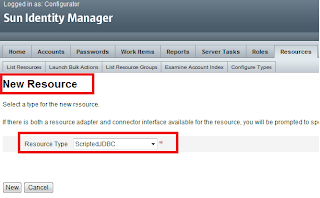
Step 4.1# Select Resource Type - Scripted JDBC


Step 4.2# Configure MySQL database table.
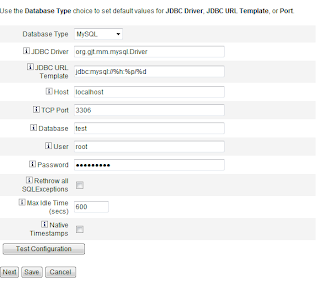


Step 4.3# Map customized Resource Action for Get User and Create User action
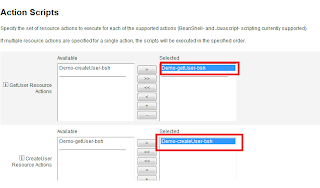


Step 4.4# Resource Schema Mapping


Step 4.5#

Finally, Scripted JDBC Resource appears in the Resource List to manage user accounts.
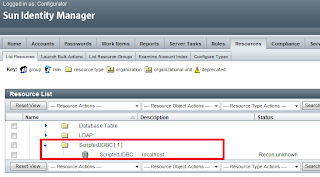


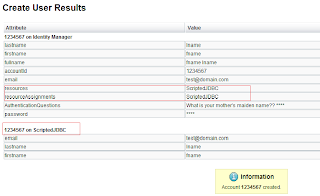
Step 5#. Create New User Account on Scripted JDBC Resource
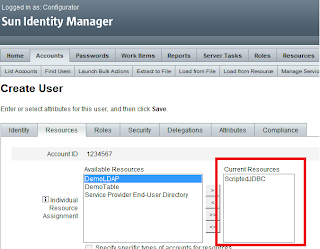


We can add our own customized Resource Actions to perform Database related operations.

Use the following URL to get more information about Scripted JDBC Resource Adapter

http://docs.sun.com/app/docs/doc/820-6551/giivs?a=view

Saturday, February 20, 2010

Active Sync V/S Reconciliation

As we always hear about ActiveSync and Reconciliation processes and these two terms always confuse us a little bit.

Here is a link that must help you to understand the difference between these two processes.

whats-the-difference-between-reconciliation-and-active-sync